


PangoBooks: Buy & Sell Books
4.71.44K Reviews
App Specs
- Version
- 3.0.39
- Updated On
- License
- Free
- Downloads
- 100,000+
- Developer
- Pangobooks Inc
- Categories
- Shopping
- Platform
- Android
Screenshots

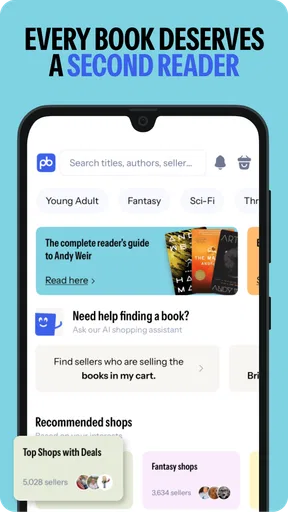

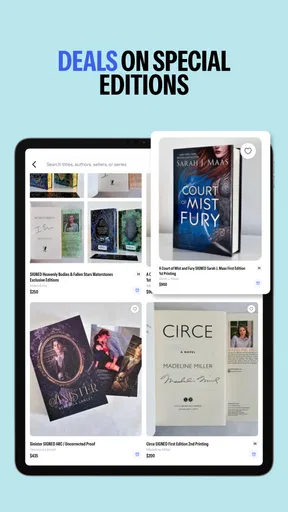
 Analysis by AppCompare
I opened PangoBooks with a very specific problem in mind: I had books taking up space, but I did not want the hassle of building a full online shop. At the same time, I wanted a more focused place to look for used reading material than a general marketplace. That starting point explains the app’s appeal. It brings buying and selling books into one reader-oriented shopping experience, so the people browsing may already understand why a particular edition, condition, or title matters.
Developed by Pangobooks Inc, this free shopping app is aimed at a simple exchange: one reader lists books, another reader discovers them, and the transaction moves from the app toward delivery. The idea is easy to understand, but the practical value depends on how carefully you prepare a listing, how clearly you communicate, and whether the book you want is actually available at a sensible total cost.
From an unused book to a completed purchase
I find that a book’s journey is easiest to manage when I think about both sides before listing: what would reassure me as a buyer, and what I can realistically handle as a seller. A little planning around condition, photos, and packing can prevent avoidable back-and-forth and make the exchange feel more predictable.
Starting with the seller’s real problem
The most useful way to approach PangoBooks is not as a place to dump unwanted books. It works better when I treat each listing as a small product page. Before opening the camera, I decide what I am selling, inspect its condition, and gather the details a buyer would need to make a confident decision. That preparation is especially important for textbooks, collectible-looking editions, workbooks, and books with highlighting or writing inside.
A quick inspection prevents the most common disappointment. I check the cover, spine, page edges, title page, and interior. If there are names, notes, stains, creases, missing inserts, or a different format from the one a buyer might expect, I make those details visible in the listing. The app makes discovery easier, but it cannot replace an honest description. A clear photo of a flaw is more useful than a vague promise that a book is in “good” shape.
This is also where I decide whether selling is worth the effort. A single inexpensive paperback may be simple to list, but packing it, handing it off, and monitoring the transaction still takes time. The app is more compelling when I have several books to organize or when the titles are likely to interest a specific reading community. For a one-off book with little demand, a local handoff or donation may be the more sensible outcome.
Building a listing that answers questions early
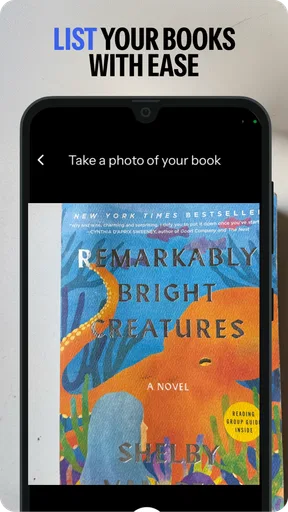
My preferred workflow is to photograph the front cover first, then add enough context to remove uncertainty. I would include the back cover when its description matters, show the spine if wear is visible, and photograph a page or interior detail when highlighting or damage affects the reading experience. The goal is not a glossy presentation. It is to help someone decide without needing a long message exchange.
Worth Reading Before You Choose

EA SPORTS FC Mobile 26 Is a Bigger Football Game, but It Takes Time

Flipboard Shows What News Apps Must Do Beyond the Feed

Switching to Android Auto Means Rethinking Your Driving Routine

Google Calendar Makes a Crowded Week Easier to Manage

Ludo King Makes the Most of the Minutes Between Plans

Baby Panda World Brings Quick Play to Modern Phones, but Its Game Library Feels Busy
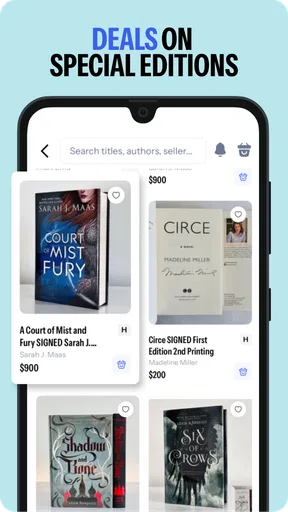
Titles and authors are the obvious starting points, but edition details can change the value of a book. I pay attention to paperback versus hardcover, special formats, study editions, and whether a book appears complete. If I am unsure about an edition, I avoid guessing. A buyer who receives something different from what they expected is more likely to be unhappy, even if the book itself is readable.
One practical tip is to write the condition before I start browsing other listings. Looking at polished listings first can make me overvalue my own copy or understate its flaws. A neutral inspection keeps the description grounded. I also keep the wording specific: “small crease on the lower front corner” tells a buyer much more than “some wear.”
Finding books without treating the app like a general marketplace
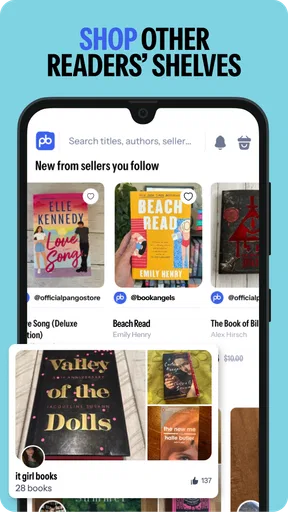
On the buying side, I begin with a reading goal rather than an endless scroll. I might search for a particular title, look for an author, or browse when I am open to an unexpected find. The reader-focused setting is a genuine strength because the inventory feels connected to personal collections instead of being mixed with every category of household item.
Discovery still requires judgment. A familiar cover does not guarantee the edition I need, and a low listing price does not automatically mean a better deal. I compare the condition, format, seller description, and the likely delivery cost before deciding. For a novel I simply want to read, a worn copy may be perfectly acceptable. For a gift, a reference book, or a book I plan to keep for years, the same condition may not be good enough.
I also find that browsing works best when I keep a short list of acceptable alternatives. If I want one specific title, I note whether I would accept another edition or a used copy with visible wear. That prevents me from choosing the first listing impulsively and helps me compare the complete purchase rather than the headline price alone.
The handoff between buyer and seller
The important handoff is the moment a private collection becomes someone else’s expected purchase. The seller supplies the description and photos; the buyer interprets them and decides whether the condition matches the intended use. That exchange is where thoughtful listings save time. If the buyer has to ask basic questions that could have been answered in the photos, the process becomes slower for both sides.
For sellers, I recommend keeping communication factual and prompt. Confirming details such as format or visible wear is more helpful than trying to persuade someone that a book is “basically new.” For buyers, I would ask a focused question when an important detail is unclear, especially about markings, completeness, or edition. A short message before purchase can prevent a much larger problem after delivery.
There is a second handoff when the seller prepares the parcel. Books are sturdy, but corners and covers can still be damaged by careless packing. I would use protection that keeps the book from shifting and make sure the package is appropriate for its size. This is one of the less glamorous parts of the workflow, yet it directly affects whether the buyer feels the listing matched the result.
That handoff also explains why the app is not a magic shortcut for selling. It can put a book in front of an interested audience, but the seller remains responsible for accurate information, preparation, and follow-through. Anyone expecting to photograph a pile, tap once, and forget about it may find the process more involved than the store summary suggests.
A realistic everyday use case
Imagine finishing a course and ending up with several books that are still useful but no longer needed. I would separate them into three groups: books worth listing individually, books that make sense as a related group, and books whose condition or demand does not justify the work. I would photograph the strongest candidates, describe markings honestly, and publish them when I have time to handle messages and packing.
A buyer searching for one of those titles may discover the listing while looking for a cheaper way to read or study. They inspect the photos, notice the annotations, and decide that the condition is acceptable. After the purchase, the seller packs the book, the parcel changes hands through delivery, and the buyer receives something that fits the original need. The successful outcome is not merely that a book changed owners; it is that both sides had the same understanding of what was being exchanged.
For me, this scenario shows where PangoBooks is strongest: turning a personal shelf into a targeted source of books for another reader. It is less useful when the seller has no patience for descriptions or when the buyer wants the absolute fastest, most predictable route to a new copy.
What happens after the decision
The result for a buyer is usually best measured by fit, not by the lowest visible price. A book that arrives in the expected format and condition can feel like a smart purchase even if another copy was slightly cheaper. Conversely, a bargain loses its appeal if the edition is wrong, the wear was understated, or the total cost approaches that of a more convenient alternative.
For sellers, success depends on whether the time spent listing and preparing the book feels worthwhile. The app can help a book reach someone who actively wants it, which is more satisfying than letting it sit unused. It also encourages me to think of my shelves as inventory with different levels of demand, rather than assuming every book deserves the same selling effort.
One advanced habit is to use the app as a sorting tool before listing anything. I look at comparable copies and ask whether my book has a meaningful reason to stand out: a desirable edition, excellent condition, useful notes, or simply a fair price. If it has none of those advantages, I would rather choose a lower-effort option than spend time competing for attention.
Where the workflow breaks
The first weak point is discovery itself. A focused marketplace is helpful when the right title is present, but it cannot guarantee that the exact edition or condition I want will appear. If I need a book immediately, need a particular academic version, or require a predictable stock level, a traditional bookseller or library may be a better first stop.
The second weak point is comparison. Used-book purchases involve more variables than a simple price list: condition, format, seller communication, delivery, and the risk of receiving something that does not match the description. PangoBooks makes the search more relevant than a broad marketplace, but I still have to perform the careful comparison myself.
The third is seller workload. Photographing, describing, packing, and responding to questions can outweigh the value of low-demand books. I would not recommend the app to someone who wants guaranteed bulk clearance with minimal interaction. It is better suited to a person who is comfortable making individual decisions and who enjoys the possibility that a book will find a reader who wants it.
There is also a human limitation: condition language is subjective. Two people can view the same crease differently, and a buyer’s tolerance for writing or highlighting may be much lower than a seller’s. Detailed images reduce that gap, but they do not eliminate it. I treat every listing as an interpretation that needs evidence, not as a final authority.
How it compares with familiar alternatives
Compared with a general marketplace, PangoBooks feels more purposeful because the central object is the book rather than the seller’s entire household. That focus can make browsing more enjoyable and can put a listing in front of people who understand book-specific details. A general marketplace may still win for local pickup, unusual non-book bundles, or reaching a much broader audience.
Compared with buying directly from a conventional bookseller, the app offers the appeal of personal inventory and used-copy variety. The trade-off is less uniformity. A conventional retailer is often easier when I want a new copy, consistent condition, fast fulfillment, or a straightforward return expectation. PangoBooks makes more sense when I value the chance to find a particular used copy and am willing to inspect the listing carefully.
Compared with donating books, selling requires more work but can return value and give the item a more direct second life. Donation is still the better answer for books with little demand, substantial damage, or no reasonable selling payoff. I would not force every book through a marketplace simply because the app makes listing possible.
Who should use it and who should skip it
I would recommend this app to readers with shelves to thin, collectors who care about editions, students looking for used course material, and buyers who enjoy browsing personal book collections. It is also a good match for someone who prefers a reader-centered environment over the noise of a broad resale platform.
I would be more cautious about recommending it to people who need a book on a strict deadline, want guaranteed new condition, dislike messaging and packing, or expect every sale to be effortless. It is not a substitute for a library when the goal is temporary access, and it is not automatically cheaper once delivery and condition are considered.
The app is free and has an Everyone content rating, which makes it easy to try for a wide range of users. It requires Android 6.0 or later, and the current Android release is version 3.0.39. Those details matter most when an older phone is involved; checking compatibility before planning a large listing session avoids an unnecessary interruption.
My conclusion after following the full journey
The real strength of PangoBooks is the complete reader-to-reader workflow, not merely the act of posting a book. It helps connect a person with unused books to another person who may genuinely want them, but the quality of that connection depends on accurate listings, realistic expectations, and careful inspection before buying.
The app has earned a 4.7 average from around 3.9 thousand ratings, and it has passed the 100 thousand install mark, signs that the concept has found an audience. I see why: the experience is more focused than a general marketplace and more personal than a standard retail catalog. Still, those figures do not remove the central trade-off. You exchange some retail predictability for the possibility of a better-targeted used-book find.
If your goal is to give books a second life or discover affordable copies from fellow readers, I think PangoBooks is worth trying. I would start with a small number of well-photographed listings, compare complete costs as a buyer, and judge each transaction by how clearly the expectations were set. Used-book shopping rewards patience, and this app works best when I treat that patience as part of the experience rather than expecting it to disappear.
Pros
- Simple listing tools make selling used books quick and convenient.
- Book discovery features help readers find affordable titles from other users.
- Marketplace supports niche
- academic
- and hard-to-find book searches.
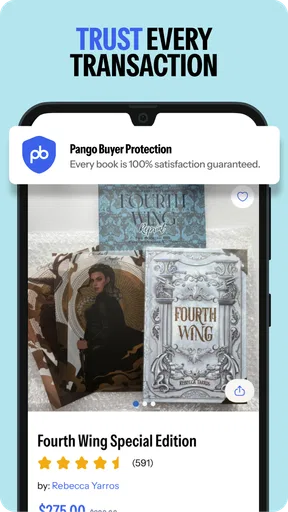
- User ratings and transaction details can help build buyer confidence.
- Useful for clearing out personal shelves while earning money back.
Cons
- Availability and shipping options may vary depending on your location.
- Popular titles can sell quickly
- limiting your chances of buying them.
- Seller fees or payment deductions may reduce the final earnings.
- Book condition descriptions depend heavily on each seller’s accuracy.
- Marketplace activity may be lower outside major regions or communities.
FAQs for PangoBooks: Buy & Sell Books
What is PangoBooks: Buy & Sell Books?
PangoBooks is a marketplace designed for buying and selling used books. After exploring the app, I found that it focuses on making secondhand book shopping feel more personal and convenient than a traditional marketplace. Users can create listings, browse books by title or category, communicate with sellers, and arrange purchases through the platform. It is especially useful for readers, collectors, parents, and students looking for affordable books.
How do I buy books on PangoBooks?
Buying a book is relatively straightforward. You can search for a specific title, browse seller listings, check photos and descriptions, review the condition, and examine the total cost before placing an order. I recommend reading the entire listing carefully because used-book conditions can vary considerably. Seller profiles and ratings may also help you decide whether a particular listing appears reliable before completing your purchase.
How can I sell my books through the app?
To sell books, you generally create a listing by adding photographs, entering information such as the title and edition, describing the book’s condition, and setting a price. Clear images and honest descriptions are important because buyers want to know about highlighting, writing, torn pages, or worn covers. Before listing many books, sellers should also review the app’s current shipping, payment, and seller-fee policies.
Are books on PangoBooks new or used, and can I trust the condition descriptions?
PangoBooks is primarily oriented toward used and pre-owned books, although some sellers may list new or nearly new copies. The condition depends on the individual seller, so it should not be assumed that every book will look the same. I suggest checking all available photos, reading the written description, reviewing seller feedback, and contacting the seller when important details such as edition, markings, or dust-jacket condition are missing.
Is PangoBooks safe to use, and what should I know before downloading it?
The app provides a dedicated environment for discovering, listing, and purchasing books, but users should still apply normal marketplace precautions. Keep communication and transactions within the platform whenever possible, verify listing details, and avoid sharing unnecessary personal information. Also check the latest privacy policy, shipping rules, refund process, and service availability in your region, since marketplace features and terms can change over time.


